
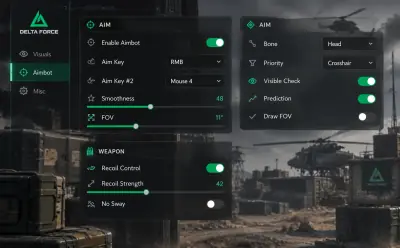
Delta Force Aimbot Settings: FOV, Smooth and Target Selection
Understand target radius, response, bone selection and the two controller keys without relying on invented presets.
Start with selection, then movement
The Delta Force aimbot has two separate jobs: choosing a target and moving the aim toward it. FOV, filters and Bone Selection govern the choice. Smooth, Speed and Stickiness affect the response. Keeping those jobs separate makes the menu easier to understand. A small selection radius does not tell you how quickly the aim will move, and a slower response does not change which body part you selected.
This guide explains the documented controls rather than prescribing a universal preset. The description does not publish slider ranges or defaults. It also does not confirm mouse-and-keyboard support. The two activation keys use native controller inputs. Read the full main product requirements before considering a configuration.
FOV is the target-selection radius
Aimbot FOV defines the area around the crosshair in which targets can be picked up. Draw FOV makes that radius visible. This is different from Camera FOV Changer, which changes the view of the scene. Widening the camera does not establish a different selection setting.
For example, if several players are close together on screen, a broader selection area can include more candidates. The published Aimbot Filter further narrows eligibility, but its exact category choices are not itemised. Avoid assuming that every ESP category can be selected as an aim target.
Smooth, Speed and Stickiness
Smooth and Speed control how gradually or quickly aim travels. Stickiness describes how firmly the aim holds a target once acquired. These controls answer different questions: movement toward a target and retention after selection. Draw Target Line gives a visible reference for the current selection.
If a response feels difficult to interpret, change one control at a time and compare it with the displayed target line. This is a method for understanding the controls, not a claim that one value is safest, more accurate or undetectable. There are no verified performance measurements or recommended numerical settings in the supplied specification.
Bone choice and target eligibility
Bone Selection offers Closest, Head, Neck and Chest. Closest is an available option; the description does not detail its selection algorithm. Head, neck and chest specify the intended aim point. Visible Check limits targeting to targets the game is showing. Ignore Knocked skips downed opponents so selection is not drawn toward a player already out of the fight.
Show Knocked is a separate player ESP option. A downed player can remain labelled while Ignore Knocked excludes them from aim selection. Displaying a marker and accepting a target are separate decisions. The player ESP guide explains the corresponding information fields.
Two keys and saved settings
The product documents two separate aimbot activation keys with native controller keybinds. It does not document default buttons, per-key profiles or separate targeting logic for each key. Confirm any input requirement outside that description before purchase.
Use the Config System to save a useful setup instead of rebuilding settings each session. When asking support about an unexpected response, include the selected bone, visibility and knocked-player options, the activation input and the exact symptom. That gives a more useful starting point than describing aim as simply too strong.
Check the stack before the menu
The main product requires Cloud DMA on one PC, plus separate GREENWARD, Static Server and AWS purchases. Windows security and virtualization requirements apply before these controls become relevant. A standalone loader is not the described delivery model.
Review the Cloud DMA dependencies and confirm current build and storefront coverage through support. Recoil controls, triggerbot, radar and stream-proof behaviour are not established by the aimbot settings list. Keep those questions separate from the confirmed controls above.