
Client Skin Changer for Supported Titles
Local cosmetic previews
Library
The finish library on this PC
Premium weapon skins are in the library. So are outfits and knife styles, inside supported games. Each item is not its own purchase.
4 cosmetic rows continue lower on this page.
Overview
Local cosmetics for supported titles
Where the finish is drawn, what stays out of your inventory, and how to check a title before checkout.
Skin Changer is a separate catalogue product for local cosmetic previews. Its listed library includes weapon finishes, character outfits and knife styles in supported games. It is not part of Delta Force Cheats.
The client changes what is drawn on your display. It does not award inventory items or create tradable cosmetics. Delta Force support has not been confirmed; ask about your exact title before buying this utility.
What a cosmetic preview changes
The listed client applies the appearance of supported finishes, outfits and knife variants on your PC. Closing the client removes those visuals. Other players are not expected to see the finish, and the account inventory does not gain ownership of an item.
Chams and Skin Changer have different roles
The main Delta Force menu uses chams to recolour players, AI, weapons, hands and the self model. That feature helps distinguish models. Skin Changer draws cosmetic styles from a separate supported library. The availability of chams does not prove that a cosmetic client supports Delta Force.
Check the game and item list
Ask support to confirm the title, version and cosmetic categories available before checkout. A general reference to major games is not a current compatibility list. Game patches and Windows updates may affect coverage.
Requirements and access
The utility lists 64-bit Windows 10/11, HVCI, Core Isolation, TPM and Secure Boot. Its loader access is separate from the Delta Force package. Review purchase options externally and follow the cosmetic client guide after access is provided.
Inventory and account limits
Local rendering is not an inventory unlock, trade entitlement or transfer of ownership. Cosmetic modifications can still conflict with game rules and lead to account action. Choose this product only after confirming that its local display function matches your goal.
Groups
Cosmetic groups
These finish types are available once the cosmetic license is active.
- Presets for premium weapon finishes
- Presets for character outfits
- Presets for rare knife styles
- Coverage across major titles
- A lightweight client on this PC
- Cosmetic drawing on this screen only
- Monthly and lifetime cosmetic licenses
- Windows 10 and Windows 11 support
When access arrives
Shots, then portal access
Shot notes stay on the left side. The right side covers portal access, then how the menu is set up.
Shots
- Layer A
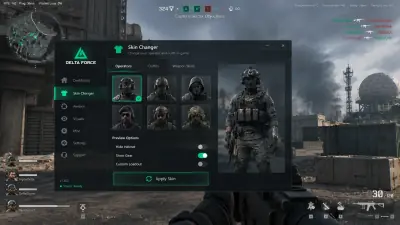
Skin Changer illustration
Supplied concept artwork. Displayed controls do not confirm current features or Delta Force compatibility.
More products
Pairs well with
The catalog beside this cosmetic client, with a separate page for each license.
- Delta Force Cheats Adjustable aimbot, player and loot ESP, chams, camera tools and saved configurations. View details: Delta Force Cheats
- HWID Spoofer Review disk, MAC and GPU identifier functions with the included trace cleaner. Account penalties remain separate. View details: HWID Spoofer
- Cloud DMA Run the Hyper-V environment on the gaming PC. GREENWARD, Static Server and AWS are required separate purchases. View details: Cloud DMA
FAQ
Questions about this page
Answers related to this page. The full FAQ covers the other topics.
Blog
Related guides
Detailed explanations of the confirmed menu, the single-PC stack and the separate utilities.
Model recolouring is confirmed in the main menu. Cosmetic-library support for Delta Force needs separate confirmation.