
Delta Force Cheats
Read gear and health, filter loot by value and tune aim response. Cloud DMA is required, with GREENWARD, Static Server and AWS purchased separately.
Product Overview
At a glance
Key capabilities
The short list for Delta Force Cheats, before the full module list.
Overview
Delta Force information and aim controls
How the listed modules and requirements fit Delta Force.
The main menu combines a player ESP overlay with loot labels and assisted aiming. ESP means extra information drawn over the game: skeletons and boxes identify tracked players, while equipment names and levels explain what they carry. Chams recolour models independently of those labels.
Operations places more weight on loot value, equipment tiers and AI. Havoc Warfare calls for readable markers across open ground. Distance caps, category filters and saved configs let you choose the information that suits each mode. Cloud DMA and its separate dependencies are required before the menu can be used.
Player information with a purpose
A health bar answers a different question from an armour level. View direction shows where a player is looking; the held-weapon field identifies what is currently equipped. Choose these fields independently rather than treating every label as equally useful. ESP is limited to entities the game has loaded and is tracking.
The Cloud DMA requirement
The loader belongs to the Cloud DMA stack on one PC. Cloud DMA, GREENWARD, Static Server and AWS are separate purchases. An external DMA box or second tower is not part of this setup. Confirm the current build, storefront and Windows edition before ordering.
Aimbot: selection and response
FOV defines the selection radius around the crosshair. Smooth and Speed change how gradually or quickly aim moves. Stickiness controls how firmly it remains on an acquired target. Aimbot Filter narrows target eligibility; it does not add an unlisted target category.
Bone Selection offers Closest, Head, Neck and Chest. Visible Check limits selection to visible targets, while Ignore Knocked skips downed enemies. Two activation keys use native controller inputs. Mouse-and-keyboard support is not confirmed. Draw FOV and Draw Target Line show the active radius and current target while you tune the response.
Player ESP: markers and equipment
Skeleton, head circle, box and snaplines can be combined. Name, distance, team number and held weapon provide text labels. Health bars and view direction add condition and orientation. Show Knocked keeps downed players visible.
Gear fields include helmet name and level, armour name and level, chest bag name and level, and hero name. In Operations these reads help distinguish equipment tiers before you decide to approach. Team Number is the published field name; its exact interpretation is unconfirmed. Max Distance limits marker range. Colours, size, transparency and brightness control presentation.
Loot ESP: price, rarity and containers
Loose-item labels show name, rarity and price. Minimum Price Filter removes items below your chosen threshold; it is a display filter rather than a guarantee about extraction value. Player corpses, AI corpses and computers have their own markers.
For an Operations route, choose which information you need before filling the screen with every category. A corpse marker identifies a body worth inspecting; it does not promise an unseen inventory or reveal entities the game has not loaded.
Chams: separate model colours
Players, AI, weapons, hands and the self model can be recoloured independently. Static colour uses a picker; RGB cycles through colours. Chams changes model appearance, while ESP supplies the separate labels and markers. The precise behaviour of Self in each mode has not been confirmed.
Camera FOV, third person and viewmodel
Camera FOV Changer adjusts the view. Third Person View uses a hotkey. Arms Scale Offset and Weapon Scale Offset each provide X, Y and Z axes for moving and scaling the viewmodel. An optional crosshair can be enabled independently.
Camera FOV and aimbot FOV have different jobs: one changes the scene framing, the other defines target selection. The published description does not provide default values, slider ranges or per-mode exceptions for viewmodel offsets.
Combat Mode Hide Entities and configs
Players, AI, items, dead containers and computers can each be hidden separately. Use these category switches to reduce clutter without changing the underlying aim settings. The Config System saves and reloads settings so you can keep useful choices between sessions.
Recoil and unconfirmed features
Recoil control appears in the product description, but its menu settings are not documented. Exact controls require confirmation. Triggerbot, radar, silent aim, stream-proof capture and Encryption Bypass are not included as confirmed features on this page.
Setup, delivery and purchase options
Check HVCI, Core Isolation, TPM and Secure Boot. Enable Intel VT-x or AMD-V in firmware and use a Windows edition with Hyper-V support. Windows 10 and 11 are listed, but your exact edition, build and game storefront must be confirmed.
Review the access terms at external checkout, including the main product and each required dependency. Follow the current guided setup rather than downloading a standalone loader. Use the existing support channels for installation or order questions. No detection guarantee is stated.
Modules
What's included
The full option list for Delta Force Cheats. Each line can be switched in the menu.
- Aimbot FOV, Smooth, Speed and Stickiness
- Two native controller activation keys
- Closest, Head, Neck and Chest selection
- Visible Check and Ignore Knocked
- Draw FOV and Draw Target Line
- Skeleton, head circle, box and snaplines
- Name, distance, team number and held weapon
- Health bars, view direction and Show Knocked
- Helmet, armour and chest bag names and levels
- Hero name and Max Distance
- ESP colours, size, transparency and brightness
- Loot name, rarity, price and Minimum Price Filter
- Player corpses, AI corpses and computers
- Independent player, AI, weapon, hand and Self chams
- Static colour picker and cycling RGB
- Camera FOV Changer and Third Person View
- Arms Scale Offset and Weapon Scale Offset: X, Y, Z
- Optional crosshair
- Combat Mode Hide Entities by category
- Save and load configs
Experience
Menu layers · After checkout
Read gear and health, filter loot by value and tune aim response. Cloud DMA is required, with GREENWARD, Static Server and AWS purchased separately.
In-game layers
- Layer A
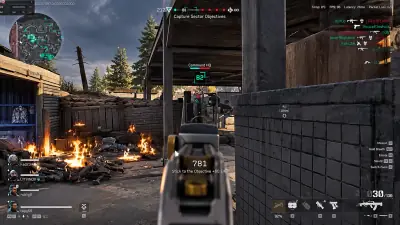
Objective capture
Supplied gameplay image showing a B2 objective, a rifle sight and player markers.
- Layer B
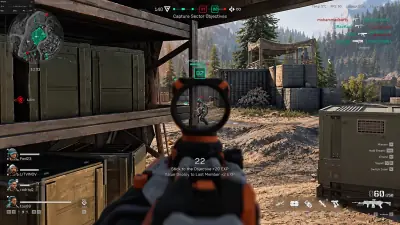
Compound engagement
Supplied gameplay image showing a compound fight, a D2 objective and an equipment shed.
- Layer C
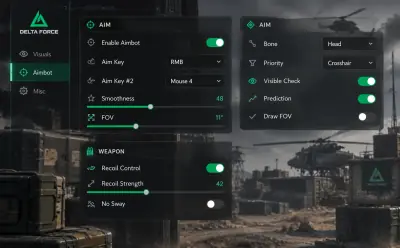
Aim-menu illustration
Illustrative aim and weapon panels. Shown values and additional controls are artwork, not a verified menu specification.
- Layer D
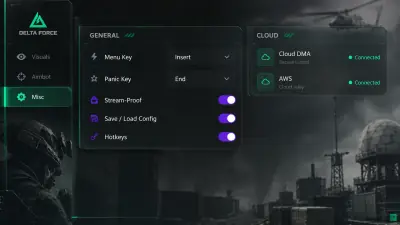
Control-menu illustration
Illustrative configuration and connection panels. The Stream-Proof label does not confirm capture protection.
More products
Pairs well with
Utilities sold beside the cheat. Each one keeps a separate page.
- HWID Spoofer Review disk, MAC and GPU identifier functions with the included trace cleaner. Account penalties remain separate. View details: HWID Spoofer
- Cloud DMA Run the Hyper-V environment on the gaming PC. GREENWARD, Static Server and AWS are required separate purchases. View details: Cloud DMA
- Skin Changer Browse weapon finishes, outfits and knife styles in supported titles. Delta Force coverage must be confirmed separately. View details: Skin Changer
FAQ
Questions about this page
Answers related to this page. The full FAQ covers the other topics.
Blog
Related guides
Detailed explanations of the confirmed menu, the single-PC stack and the separate utilities.
Understand target radius, response, bone selection and the two controller keys without relying on invented presets.
A field-by-field guide to equipment reads, player markers, distance limits and downed-player visibility.
Use the documented loot fields to reduce clutter and distinguish loose items, corpses and computers.
Separate model colouring from camera framing, third person and arms or weapon offsets.
A complete pre-purchase checklist covering the confirmed menu, separate stack purchases and compatibility questions.