
HWID Spoofer and Delta Force: Account Penalties vs Device IDs
Understand what the separate hardware utility changes and what to confirm before treating a sign-in problem as a hardware restriction.
Identify the problem before choosing a utility
An HWID Spoofer changes hardware identifiers. An account sanction is a different record. The distinction matters because a device utility cannot be presented as account recovery, a ban appeal or a guarantee of access. For a Delta Force player, the first task is finding out which problem the message actually describes.
Record the exact error, when it appears and which device is involved. A launch failure can also concern Windows security, missing virtualization or the Cloud DMA environment. Buying another tool before identifying that layer can leave the original issue untouched.
What the separate product lists
The catalogue’s HWID Spoofer lists disk serial rewrites, MAC address changes, GPU identifiers and related hardware fingerprints. It includes a trace cleaner. These functions describe device data and cleanup; they do not establish that an account sanction has been lifted.
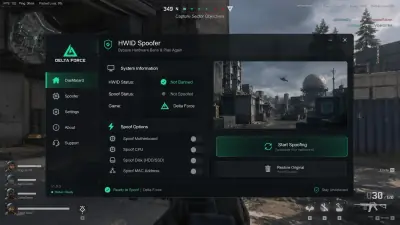
The protected panel images show the utility’s own interface. They are not evidence that your current Delta Force build is supported. Likewise, a list of anti-cheat families does not prove every title in each family works after every update. Confirm the precise title and version with support before checkout.
Keep hardware and account conclusions separate
A hardware-related restriction can concern the machine. An account penalty concerns the account. A failed sign-in by itself is insufficient to diagnose either. Network, installation and service problems can produce different failures, so do not interpret every error as an HWID block.
The useful evidence is the message and its context, not an invented diagnosis. This guide does not recommend creating replacement accounts to test a sanction. Use the current support process to establish what the utility can address and whether the documented coverage applies to the device involved.
Requirements and the cleaner
The utility lists 64-bit Windows 10 or 11, administrator rights, internet access, HVCI, Core Isolation, TPM and Secure Boot. The cleaner belongs to the same utility license. Follow the supplied workflow rather than borrowing an old sequence from an unrelated title.
Do not confuse the cleaner with a promise that every trace or restriction disappears. The product functions do not guarantee detection protection, account restoration or immunity to later enforcement. Exact title coverage is a compatibility question, not an outcome implied by the word spoofer.
How it fits the Delta Force purchase
HWID Spoofer is sold separately and is not part of the main Delta Force package. It does not replace Cloud DMA, GREENWARD, Static Server or AWS. Those are infrastructure requirements for the main product; identifier changes answer a different need.
Before purchasing, compare the Windows checklist with your error and ask support about current utility coverage. If the issue is account-related, do not buy on the expectation of account recovery. If it is an installation problem, keep working on the failed setup layer. The right next step follows the evidence.